Automatic estimate
When a chat is displayed as an international phone number, Local Time for WhatsApp Web – Contact Time Zone estimates a country and default time zone from its calling code.
Chrome extension for WhatsApp Web
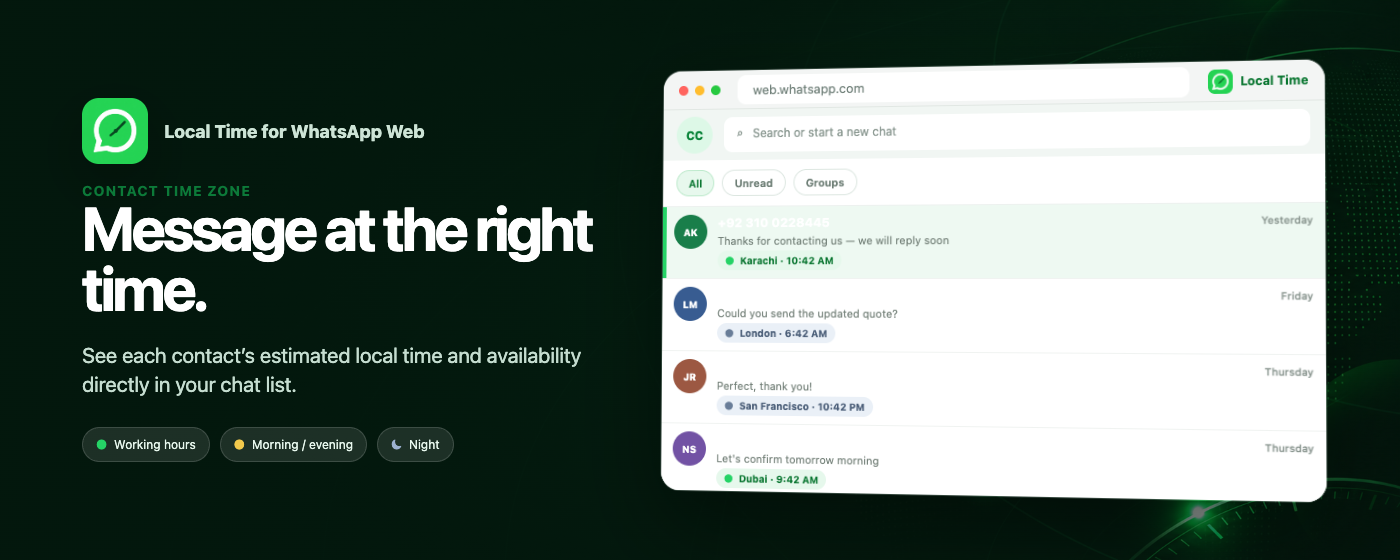
Local Time for WhatsApp Web – Contact Time Zone shows a contact’s estimated local time and work-hour status directly in your WhatsApp Web chat list, helping international conversations start at a better moment.
Independent software by NIUBIAPP. Not affiliated with, endorsed by, or sponsored by WhatsApp or Meta.
The right moment, visible at a glance
Keep a useful time cue beside the conversation and reduce the chance of messaging customers, partners, or colleagues at an inconvenient hour.
When a chat is displayed as an international phone number, Local Time for WhatsApp Web – Contact Time Zone estimates a country and default time zone from its calling code.
Clear status indicators show working hours, morning or evening, and night without opening a separate time-zone tool.
Correct any estimate by assigning an IANA time zone to a contact. Overrides remain stored locally in Chrome.
How Local Time for WhatsApp Web – Contact Time Zone works
No separate dashboard is required. Local Time for WhatsApp Web – Contact Time Zone works where international conversations already happen.
Local Time for WhatsApp Web – Contact Time Zone runs only on web.whatsapp.com and watches the visible chat list for supported contact labels.
The estimated local time and status appear beside the contact, with daylight-saving time handled automatically.
Use the toolbar popup to select a time zone, switch between 12-hour and 24-hour formats, or remove an override.
Designed for international conversations
Local Time for WhatsApp Web – Contact Time Zone is useful for sales teams, support staff, exporters, founders, and anyone who regularly messages customers or partners across time zones.
A calling code indicates where a number is registered; it does not reveal a contact’s current physical location. Countries with multiple time zones use a default estimate until you choose a manual override.
Privacy details
Phone-number parsing and time-zone estimation happen locally. Local Time for WhatsApp Web – Contact Time Zone reads only the visible chat-list labels and current-chat name needed to provide the feature.
Free Chrome extension
Automatic detection, work-hour status, display settings, contact overrides, and backup tools have no trial, subscription, or license limit.
Install from the Chrome Web Store and use every feature without a paid unlock.
Install freeSupport is voluntary and does not unlock, remove, or change any feature.
Support developmentLocal Time for WhatsApp Web – Contact Time Zone support
Include the extension version, Chrome version, the displayed contact label, and a screenshot without message content or other sensitive information.